
1. What this program is
AURA is a subscription relationship-management platform for sales and insurance professionals operating at connectingaura.net. Customers with active accounts can optionally link a mobile phone number to text our AI assistant, Sage, from their phone. The program is primarily two-way and conversational: the user initiates an exchange and Sage replies with information drawn from their own AURA account (calendar events, recent emails, contacts the user already corresponds with). The only messages Sage sends that the user did not just ask for are optional briefings — for example, a heads-up before an upcoming meeting. These are off by default and are sent only after the user turns them on with a separate in-app toggle; Sage never sends promotional or marketing messages. Linking a phone is entirely optional, and consent to receive messages is not a condition of creating, paying for, or using an AURA account.
2. Who can opt in
Only signed-in AURA customers can opt in. There is no public sign-up form for the SMS program. A mobile number is only enrolled after the customer signs in to the web application, navigates to the Sage section, taps “Link phone for SMS,” enters their number, and confirms a one-time 6-digit verification code we send to that number via SMS.
3. How users opt in
- Sign in to AURA at connectingaura.net.
- Open the Sage section from the left navigation.
- Tap “Link phone for SMS.”
- Read the disclosures shown on the link-phone screen (reproduced verbatim in section 4 below).
- Enter a mobile phone number and tap “Send code.” This is the affirmative opt-in action.
- We send a 6-digit code to that number via SMS.
- Enter the code in the verification field and tap “Verify.” The number is only enrolled after successful code verification.
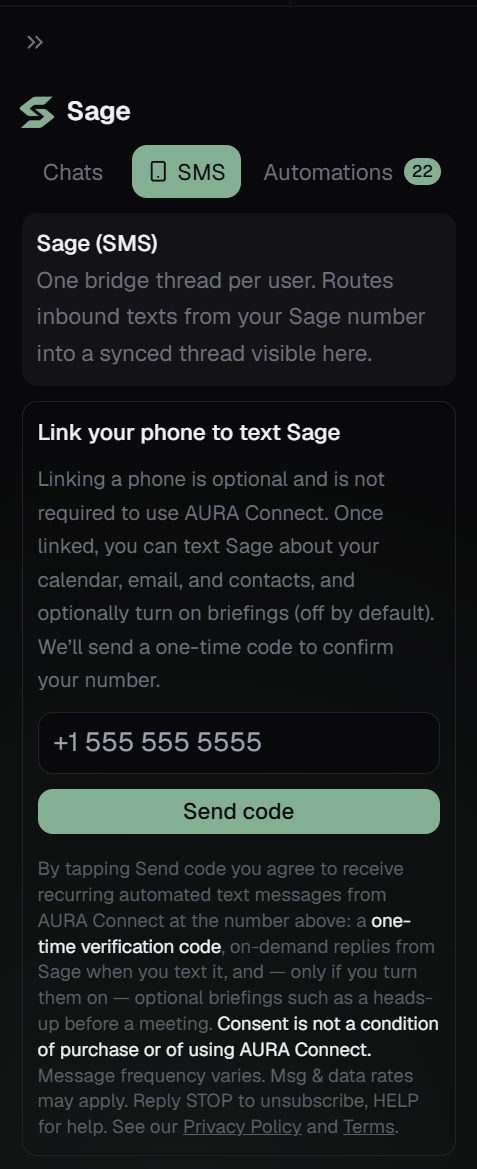
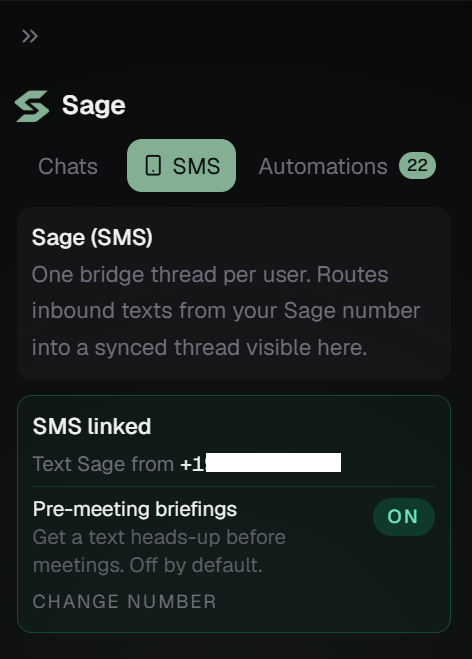
The consent text shown directly above the “Send code” button is reproduced verbatim in section 4 below.
4. Disclosure shown before opt-in (verbatim)
The following text is shown directly above the “Send code” button on the link-phone screen before any phone number is captured:
By tapping Send code you agree to receive recurring automated text messages from AURA at the number above: a one-time verification code, on-demand replies from Sage when you text it, and — only if you turn them on — optional briefings such as a heads-up before a meeting. Consent is not a condition of purchase or of using AURA. Message frequency varies. Msg & data rates may apply. Reply STOP to unsubscribe, HELP for help. See our Privacy Policy and Terms.
5. Types of messages
- Verification codes during phone linking. Example: “Your AURA verification code is 482915. This code expires in 10 minutes. Reply STOP to unsubscribe.”
- Opt-in confirmation — a single message sent immediately after successful verification, confirming the number is linked. Example: “AURA: You’re linked to Sage. Text me anytime, and turn on optional briefings in the app if you want them. Msg frequency varies. Msg & data rates may apply. Reply STOP to unsubscribe, HELP for help.”
- Conversational replies from the Sage assistant, sent only in response to a message the user has just initiated. Example: “You have 3 meetings tomorrow: 9:00 AM Sales Sync, 11:30 AM with Doug Reilly, 2:00 PM Pipeline Review. Want me to send the Doug Reilly Zoom link?”
- Optional briefings — short, helpful heads-ups the user can switch on with a separate in-app toggle (off by default), such as a note before an upcoming meeting. The user controls these and can turn them off at any time. Example: “Heads-up: you meet Doug Reilly at 11:30 AM. Last thread was the Q2 renewal; he asked for updated pricing. Reply STOP to opt out.”
6. Frequency
Message frequency varies and is controlled by the user. Most messages are direct replies to a text the user just sent. The only messages the user does not explicitly request are the optional briefings described above, which are off by default, must be turned on with a separate in-app toggle, and can be turned off at any time. We do not send promotional or marketing messages.
7. Costs
Message and data rates may apply, depending on the user’s mobile carrier plan. AURA does not charge users for SMS usage beyond their subscription fee.
8. Opting out
- Reply
STOPto any message to unsubscribe immediately. We honor the standard carrier opt-out keywords:STOP,STOPALL,UNSUBSCRIBE,CANCEL,END,QUIT,OPTOUT,REVOKE. - After opt-out the user receives a single confirmation: “You have successfully been unsubscribed. You will not receive any more messages from this number. Reply START to resubscribe.”
- Reply
HELPorINFOfor help. - Users can also remove the linked number at any time from Sage settings inside the application.
9. Data sharing
We do not sell, share, or transfer mobile information or SMS opt-in data to third parties or affiliates for marketing or promotional purposes. See section 4 of our Privacy Policy for the full data-handling disclosure.
10. Contact
Questions about the SMS program? Email support@connectingaura.net.